Many retailers are adopting a modern, MACH approach to their commerce experiences, including for in-person payments. For example, they may create a version of their ecommerce website that is specific to in-person payments, and that is meant to be used by salespeople on a showroom floor. This is especially true for digital-first retailers, where the device is used by a salesperson on the floor and shown to the customer - for example, to explore customization options, additional sizes, and choices, or even to sign up for loyalty programs. Retailers already spend considerable time on that ecommerce web stack, and want to use as much of it for in-person as well, instead of maintaining two separate stacks.
If the reader they chose is a smart reader, such as the Stripe Reader S700, then their website might make use of our server-driven integration path. However, if they want to use a mobile form factor - for example, an iPad paired with an M2, or an Android tablet leveraging Tap to Pay - things get more complicated. Indeed, the M2 (or the WisePad 3, outside of the US) can only integrate via our mobile SDKs since they lack Internet connectivity capabilities. So an iPad can only communicate with a Bluetooth-connected M2 via the iOS (or React Native) SDK. The same limitation applies to Tap to Pay - a web browser running on a mobile device or NFC-equipped tablet cannot communicate directly with the local reader to take payments - it needs to integrate via our mobile SDKs.
In general, this all means the web-based POS needs to be completely refactored into a native app. This is clearly a sizable undertaking, and defeats the economies of scale discussed above.
This article describes the concept of a wrapper app, which simultaneously:
- Loads the web-based POS and allows the salesperson to interact with the site
- Integrates with a mobile or Tap to Pay reader via SDK
- Detects events from the former to initiate payment requests to the latter
This post offers a proof-of-concept in React Native, which you could then use for:
- A tablet paired with a Bluetooth reader
- A phone or tablet using Tap to Pay technology
Application overview
The application comprises:
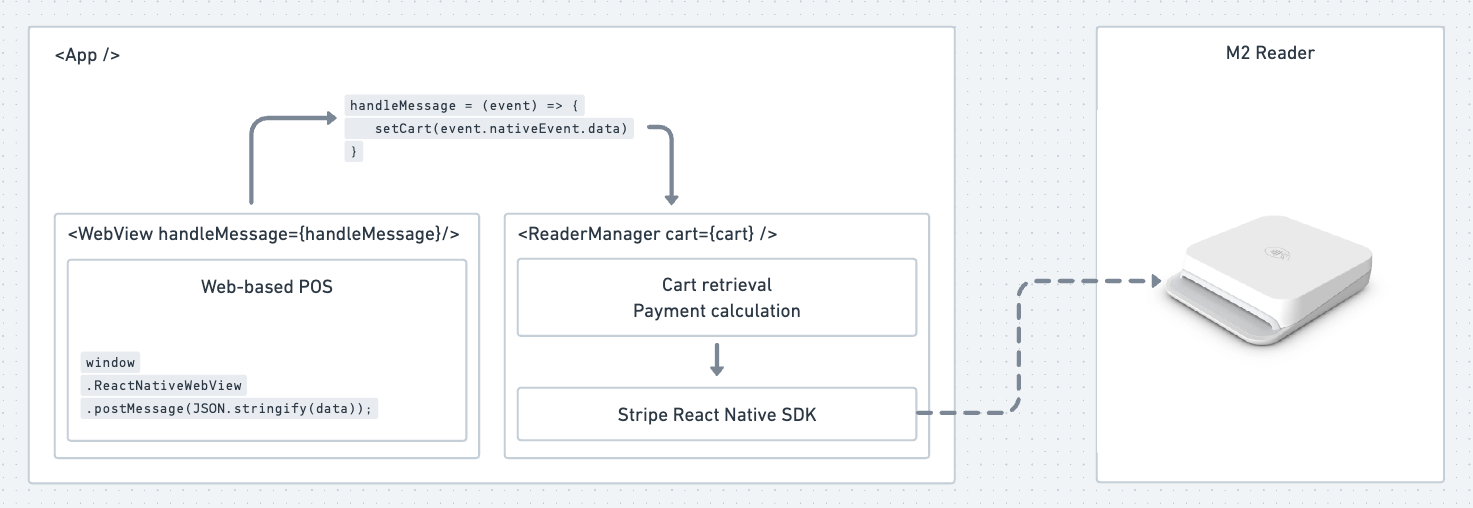
- A wrapper App component, which defines a
handleMessagefunction. This function listens to events coming from the WebView component and sets a state variable to keep track of the cart's details. This could be as simple as a cart ID - for security purposes, only the backend would have the details of the cart, so it cannot be manipulated into a cheaper basket. - A WebView component, which loads the web-based POS itself. That component takes the
handleMessagefunction as a prop. - A web-based POS that can build a cart and save its details to a backend. When ready to pay, the salesperson presses a button in the site that fires
window.ReactNativeWebView.postMessage(JSON.stringify(data));wheredatacontains information about the cart. This would be the cart ID, salesperson ID, store ID, and any other relevant information. - A ReaderManager component, running the Stripe Terminal React Native SDK, which is tasked with discovering readers and connecting to them. This could be an M2 reader, via Bluetooth, or even a local reader, via Tap to Pay. This component takes the cart state variable from the parent App component. At the appropriate time (e.g. the
cartstate is populated with an ID and a state), the component queries the backend to calculate how much to charge the customer, and then calls thecreatePaymentIntent(),collectPaymentMethod(), andconfirmPaymentIntent()SDK methods.
Notifying the web-based POS that the payment was successful might be done via webhooks (fired from Stripe to the POS backend, and then to the POS frontend via websockets), or via the POS frontend polling its backend.
Wrapper application architecture
The application has 3 main components - an App parent component, where state is managed, a WebView component, and a ReaderManager component. You could also use a state management library like Recoil.
This diagram shows the Stripe React Native SDK managing an M2 reader but, as mentioned previously, this could be a WisePad 3 or Tap to Pay reader.
Processing a transaction
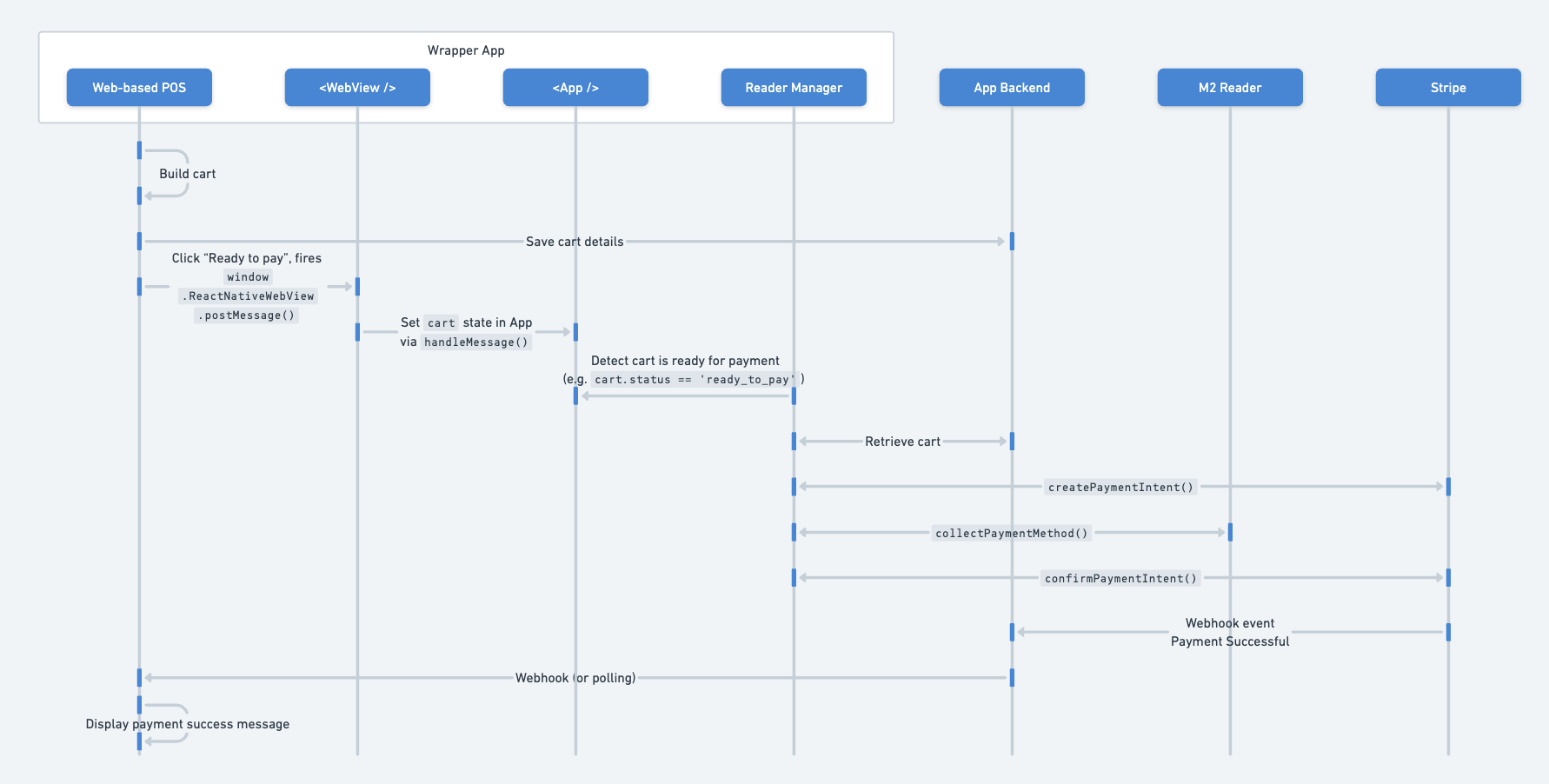
- The salesperson consults with the customer and adds items to the cart. As items are added to the cart, they may be saved in a cookie and/or sent to the POS backend.
- At the conclusion of the browsing session, the salesperson clicks a button that saves the final cart details to the backend.
- The salesperson clicks a button signifying the customer is ready to pay. This emits a
window.ReactNativeWebView.postMessage(JSON.stringify({ cart_id: 'ABC123', status: 'ready_to_pay' }))message. - The WebView component detects this message via its
handleMessagefunction, which was passed as a property by the parent App component. This function sets the cart state value in the App component, to something like{ cart_id: 'ABC123', status: 'ready_to_pay' }. - The ReaderManager component gets the updated cart state and finds it is ready for payment.
- The ReaderManager queries the backend to retrieve cart details based on the cart ID - these details might include the owed amount based on server-side calculations.
- The ReaderManager calls the SDK method
createPaymentIntentwith the right amount, currency, metadata, etc. Metadata attributes should include the cart ID. - The ReaderManager calls the SDK method
collectPaymentMethodto instruct the reader to receive card details via tap or insert. - The ReaderManager calls the SDK method
confirmPaymentIntentto confirm the payment. Stripe gets the card details at that stage, sends the request to the card issuer, via the networks, and returns an auth status which the ReaderManager can then surface to the salesperson (e.g. "card accepted" or "card declined"). - The ReaderManager knows the payment status but the POS does not. In order for it to be notified, the backend listens for the
payment_intent.succeededwebhook event which has the cart ID passed in the metadata attribute, and then sends the notification to the POS via a WebSocket.
Example application
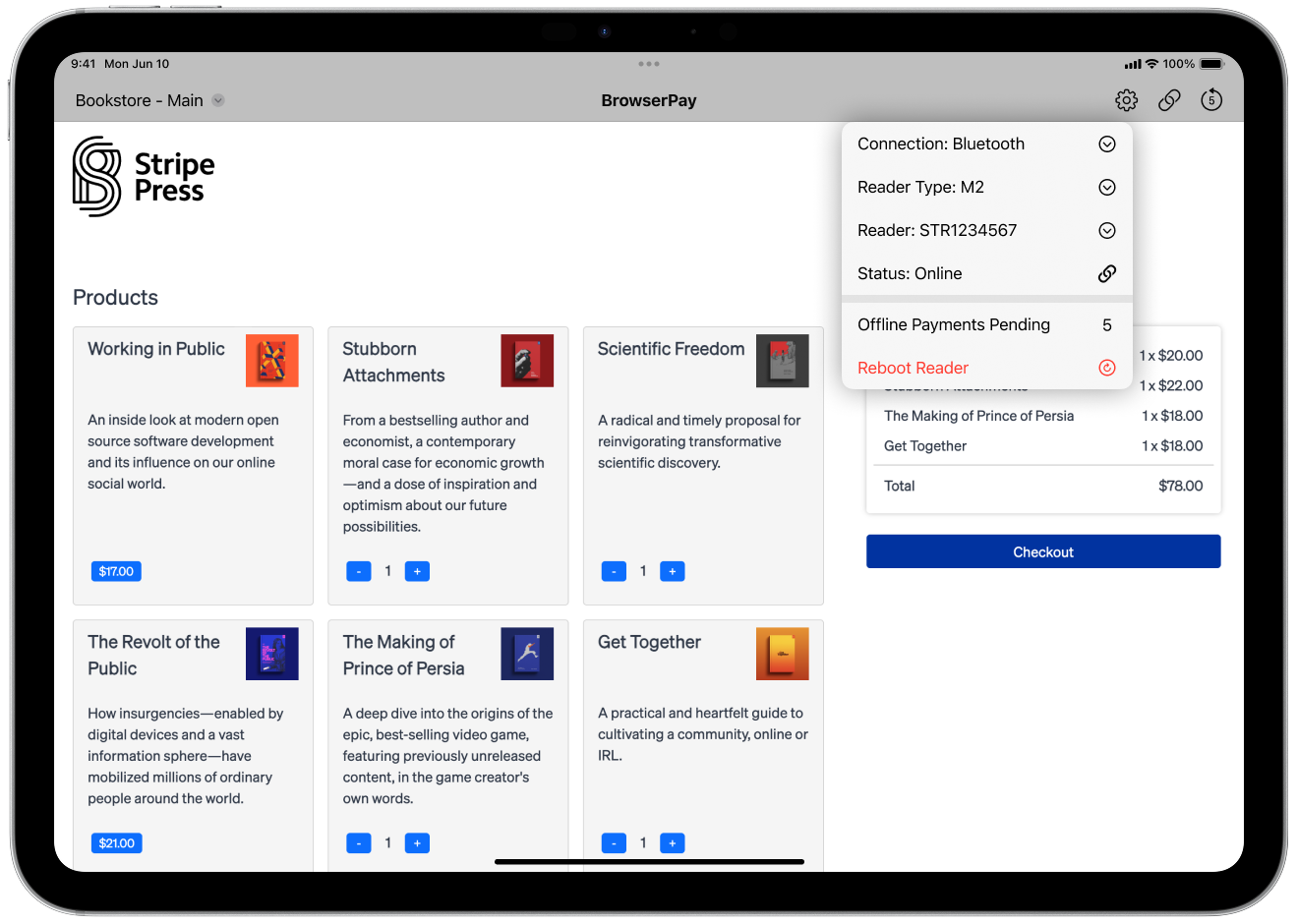
The following is a mock-up of what such an application could look like:
- The gray bar at the top is the main app component.
- The icons to the right of the gray bar are part of the ReaderManager component. They show some high-level status information (for example, is the reader connected, are there pending offline payments, etc.)
- The ReaderManager can also show a Settings panel to help end-users select the reader type they want to connect to (for example, M2, or Tap to Pay), the reader they want to connect to, etc.
- The main panel in white is the WebView component. In the upper-left hand corner, a drop down allows the end-user to select various web-based POS experiences.
Limitations and security considerations
WebView does introduce some limitations compared to a native application. Performance might not be as smooth, especially with complex web apps, and offline mode is limited if the web app itself doesn't utilize caching effectively. Security must be evaluated carefully, and debugging the web app and the wrapper is more complex than just debugging one—the whole is more than the sum of its parts. Additionally, some native functionality may not be accessible from a web app being served in a WebView.
The main security risks for React Native apps with WebView components include WebView script injection accessing the native bridge, spoofed bridge messages altering or triggering charges, weak IDs or sessions enabling tampering, and webhook/API replay attacks. Several strategies can help mitigate these risks: implementing strict HTTPS and Content Security Policy (CSP), using origin-checked and signed bridge messages, incorporating schemas and one-time nonces in bridge communications, and implementing server-side amount and cart validation.
Conclusion
This wrapper app approach offers retailers a practical solution for integrating web-based point-of-sale systems with mobile Terminal readers like the M2 or Tap to Pay technology. By combining a React Native wrapper with WebView components and the Stripe Terminal SDK, retailers can use their existing ecommerce infrastructure for in-person payments without requiring a complete native app rebuild.
The architecture enables communication between web-based POS systems and mobile readers through message passing and state management. While this approach introduces some limitations, it provides significant cost savings and development efficiency compared to maintaining separate technology stacks.
To learn more about developing applications with Stripe, visit our YouTube Channel.