Many industries require more specific or stricter compliance requirements. With Stripe Workflows, you can automate additional compliance requirements to align with your business needs. You can implement a workflow to automatically flag transactions based on criteria such as high order values, unfamiliar sales regions, or other potential fraud indicators. Creating a workflow to streamline compliance enhances risk management and boosts operational efficiency by prompting for further review before order processing.
For example, a new customer order exceeding a certain monetary threshold might indicate an accidental over-purchase or potential fraud. Similarly, an order from a region where you’ve never sold before requires additional scrutiny to verify the customer’s legitimacy. Additionally, transactions exhibiting behavioral patterns commonly associated with fraud can trigger alerts for your team’s assessment.
In this sample workflow pattern, we’ll trigger an email alert to a designated team member whenever an order surpasses the predefined threshold, enabling your team to address any issues with the order and earn customer trust.
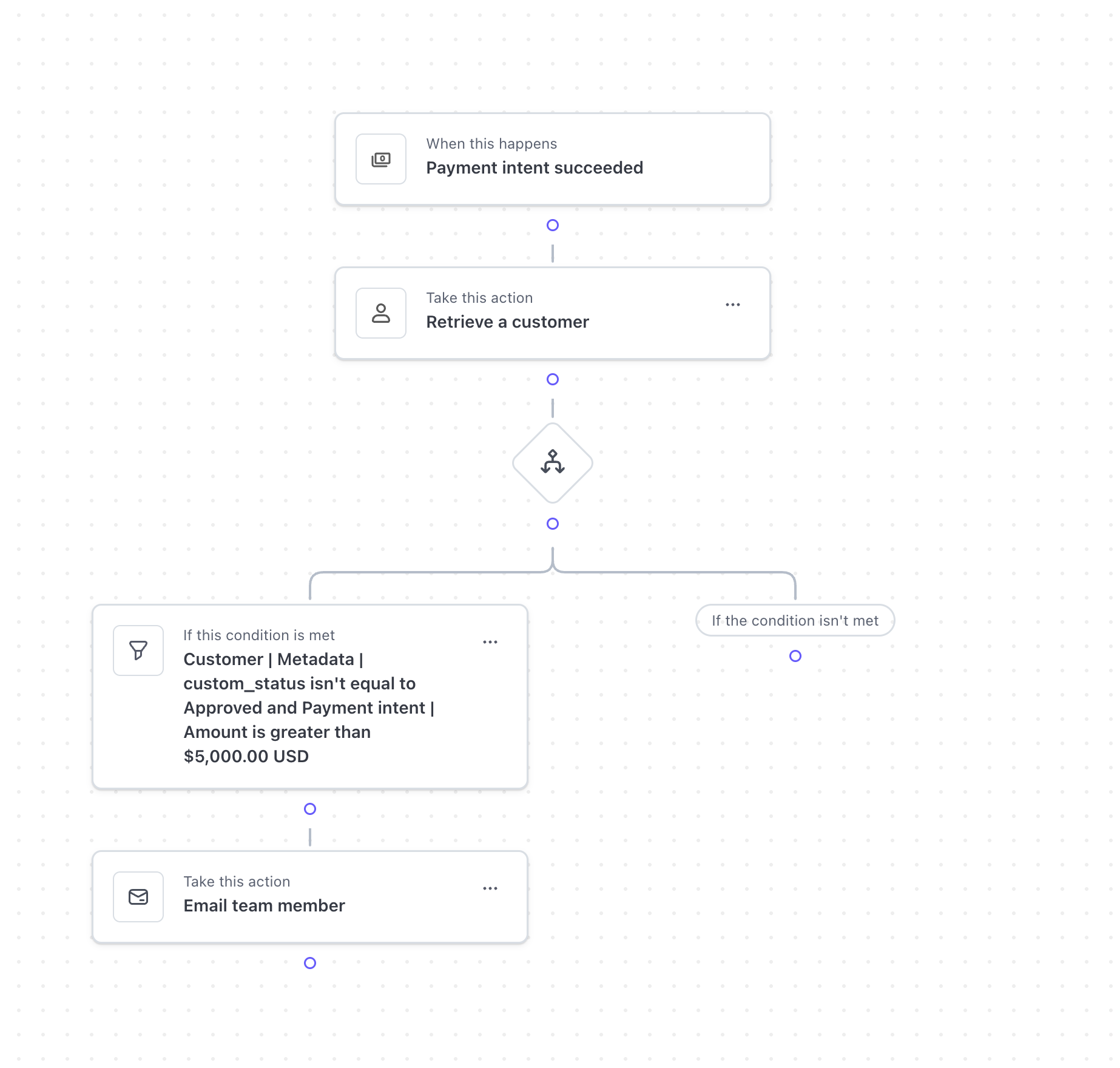
Building a workflow to flag transactions
To build a workflow when a customer order exceeds a monetary threshold:
- Add trigger: Payment intent succeeded.
- Add a step: Retrieve a customer, for Customer ID choose Payment intent | Customer ID.
- Add a condition.
- Click the “If this condition is met” box and select Retrieve a customer, then select Metadata, then select custom_status. Select "isn't equal to” and type “Approved.”
- Click Add more.
- Select Payment intent succeeded, select Amount. Select is “greater than” and type your threshold of $5,000.
- Click Done.
- Under the condition click Add step and Add action: Select Email a team member, select a team member or multiple team members from the list, type instructions in the email body field, and click Done.
What is Stripe Workflows?
Stripe Workflows provides a visual building interface in the Stripe dashboard, to help you automate tasks and processes by defining a series of actions that happen sequentially. Workflows is ideal for multi-step processes and is compatible across multiple Stripe products, allowing you to streamline processes, enforce business rules, and reduce manual effort.
To explore additional workflow patterns, see:
To learn more about developing applications with Stripe, visit our YouTube Channel.