Developers now have more ways than ever to build and publish an app for the Stripe App Marketplace. New integration pathways allow apps to extend Stripe by appearing in core product flows and giving users full-page apps in the Stripe Dashboard.
Each of these new extensibility primitives plays its own role in shaping your app's user experiences. Full-page apps enable you to build rich experiences in the Dashboard. Scripts run custom logic at Stripe-defined extension points. Remote functions connect Stripe to your backend, custom objects store app-specific data, and Stripe Workflows connects triggers and actions in an automation.
With all of these new primitives to choose from, it's important to understand which to choose when, and how to combine them in your app. Our first piece of advice: start with the task the user needs to complete, and then choose the simplest combination that gets them there. In this guide, we’ll introduce these new primitives, so you can map each one to the task your user needs to accomplish.
Start with the user task
Imagine your app syncs Stripe Customer objects with records in a customer relationship management (CRM) system. Most records match automatically, but some need a person to resolve an ambiguous result. That process might need backend matching logic, durable state, and a place to review exceptions. Those are different design problems and, for each, Stripe provides a different primitive that can be included in an app and published on the Stripe App Marketplace.
What the task requires | Stripe primitive | Best-fit use cases |
A dedicated user experience in the Stripe Dashboard | Full-page apps |
|
Lightweight partner-defined logic running in Stripe | Scripts |
|
Partner-hosted logic invoked by Stripe | Remote functions |
|
Durable app-specific data stored in Stripe | Custom objects |
|
A single- or multi-step action initiated by a trigger | Stripe Workflows |
|
Full-page apps: give users an entire page in Stripe
Give your app a full page in the Stripe Dashboard. You can build tabbed navigation, overview pages, tables, and list-to-detail flows using Stripe components. Routing supports bookmarkable URLs and links to specific views.
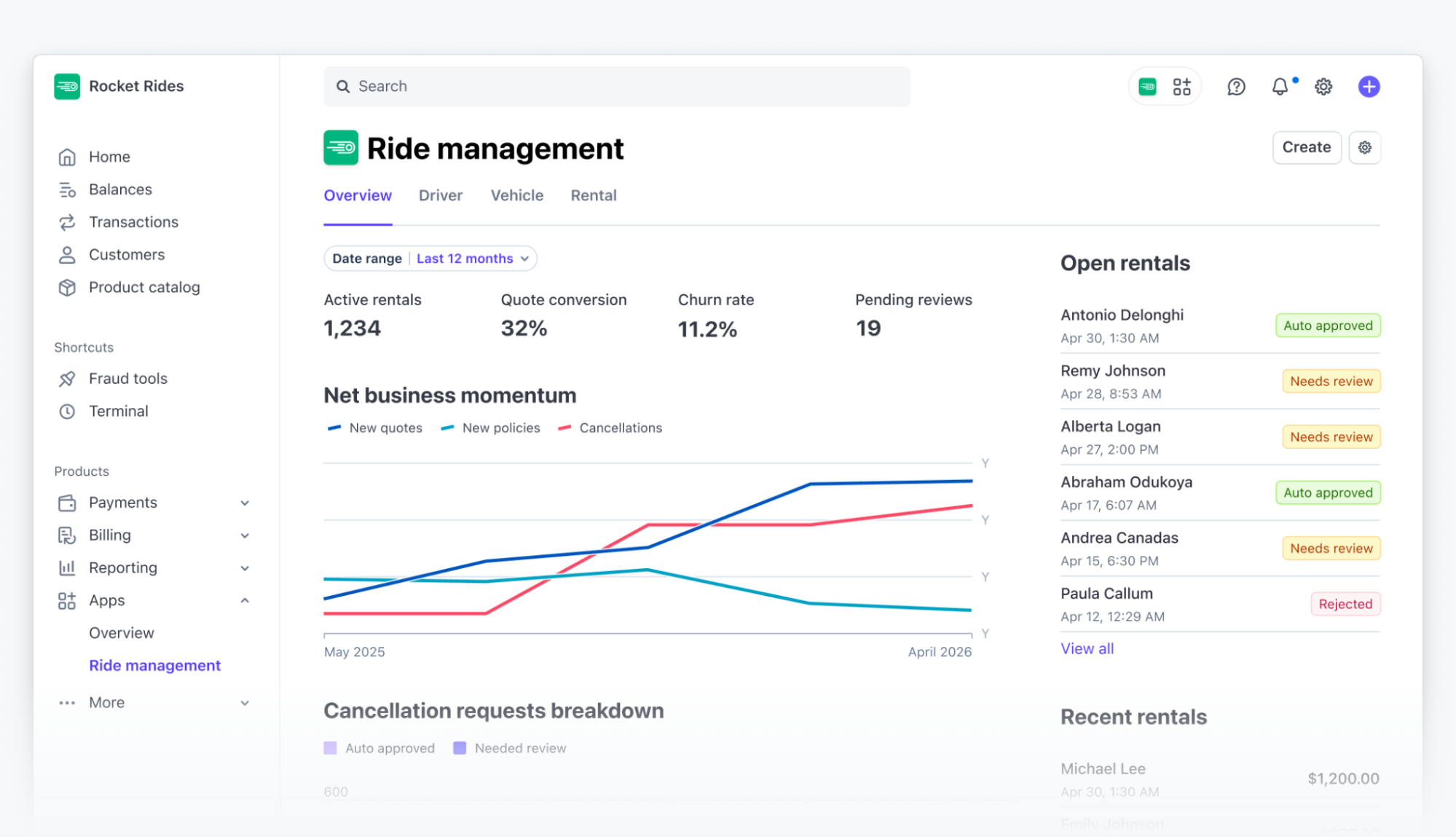
Choose this surface when users need a UI; for example, an overview of their account, a list of records to review, a reconciliation view, or a metrics dashboard. In the CRM example mentioned earlier, an app user could filter unmatched customers, inspect suggested matches, and resolve exceptions directly in the Stripe Dashboard.
Ask where the app user already spends most of their day. If they work primarily in Stripe and need Stripe context to make a decision, a dedicated page in the Dashboard can remove a lot of tool switching. If the action belongs to one Stripe object, such as a Customer or Invoice, a context view may be enough. If the integration handles the task automatically, you might not need a UI at all.
Design questions: Who is the primary user? Why should this workflow live in Stripe rather than the partner product? Which native Stripe surfaces should remain the system of action?
See the full-page apps guide and example app.
Custom objects: model the data your app adds
Custom objects let you define structured records in Stripe, with typed fields and relationships to Stripe objects and other custom objects. They can also have methods that attach business logic to those records.
In the CRM example, a customer-match record could link a Stripe Customer object to its CRM record and track whether the match is confirmed or still needs review. That state is useful when both the Dashboard experience and the automation need to work with the same relationship.
Use metadata when a few values attached to an existing Stripe object are enough—for example, a single external customer identifier. Consider custom objects when the relationship needs its own structure, lifecycle, or associated data. If the information already lives in your backend and Stripe-side experiences don’t need it, another copy may add unnecessary synchronization work.
Consideration | Metadata | Custom objects |
Data model | Key-value data attached to a supported Stripe object | Structured app-defined records with their own fields and relationships |
Value types | Keys and values are stored as strings | Supports defined field types such as text, numbers, dates, enums, and monetary amounts |
Relationships | The data belongs to the Stripe object carrying the metadata | A record can relate to Stripe objects and other custom objects |
Behavior | Stores additional values; it doesn’t define app-specific methods | Methods can attach app-specific business logic to records |
Use it when | You need a small identifier, label, or integration-specific value on an existing Stripe object | The data needs its own schema, relationships, lifecycle, or Stripe-side behavior |
Avoid it when | The information needs complex structure or its own lifecycle | Stripe-side experiences don’t need the data and your backend is already its clear system of record |
For the CRM integration, store a single external CRM ID in the Customer object’s metadata when that is the only relationship you need. Consider a custom object when the match has its own status, confidence, review history, or relationships that Stripe-side experiences and automations need to access.
Decide which system owns each field and what happens when a match changes. Storing a relationship makes it explicit; your integration still needs to keep it current.
Design questions: What is the minimum durable schema? Who owns each field? What are the permission, retention, migration, and lifecycle requirements?
The custom objects guide covers available capabilities and access.
Scripts: run custom logic at a supported extension point
Scripts let you write TypeScript that runs in Stripe’s managed environment. An extension point defines when Stripe calls your code, what inputs it receives, and what it must return.
In Billing, scripts can customize specific decisions inside the billing flow. The currently documented extension points cover customer balance, recurring billing item handling, and prorations. For example, a proration script could implement a business policy that calculates credits by whole days. These scripts participate in the billing decision itself; their interface determines what they can change.
You can also implement a custom action for Stripe Workflows with a script. For the CRM app, that action might transform configured input into the CRM’s expected format and call its API. External calls use declared endpoints, with Stripe managing secret storage and egress authentication.
Use a script when the operation fits the extension point’s contract and you want Stripe to host the logic. The code doesn’t have to be a pure calculation, but treat the runtime as a constrained execution environment, not as a general-purpose Node.js server.
Script-backed custom actions for Stripe Workflows currently have a 30-second execution timeout. Stripe retries timeouts and unhandled script errors so design side effects to avoid duplicate records or notifications. Billing scripts have their own constraints and failure behavior; don’t assume the same execution contract applies across extension points.
Design questions: Is the logic deterministic and reusable? What are the runtime, observability, and rollout constraints? When should processing move to partner infrastructure?
Read the guides for Billing script authoring and custom actions.
Remote functions: use the backend you already operate
A remote function lets Stripe invoke an HTTP endpoint on your infrastructure. For a custom action in Stripe Workflows, Stripe sends a signed request to your endpoint, and your implementation returns the action’s result.
Choose this approach when the operation belongs in your existing backend. The CRM app might need to search a private identity database, apply an existing matching model, or coordinate internal services. You retain control over the language, deployments, credentials, and observability for that code.
Hosting the code yourself doesn’t remove the invocation deadline. Remote-function custom actions in Stripe Workflows currently have a 20-second timeout. Verify request signatures and make execution idempotent: Stripe retries timeouts and 5xx responses, and the request ID remains stable across retries.
If you return success and start background work, Stripe Workflows records the action as successful before that work finishes. For longer operations, distinguish “work accepted” from “work completed” and design how completion and failure become visible to users.
When to use a script vs. a remote function
This choice usually comes down to dependencies and ownership. If the action only needs a short transformation and a declared API call, keep it in a script. If the logic already lives in your backend, expose it through a remote function rather than rebuilding it in Stripe.
Design questions: How will requests be authenticated and verified? Are operations idempotent? What are the timeout, retry, error-handling, and sandbox behaviors?
Read the guide to build a custom action with a remote function.
Stripe Workflows: connect triggers and actions
Stripe Workflows lets users connect triggers, conditions, and actions in a visual builder. An automation can be triggered by a Stripe event, a schedule, or an on-demand invocation. Actions can include custom actions supported by a script or a remote function.
As an app developer, you can add a custom action alongside Stripe’s built-in actions. You define its inputs and outputs; the user decides where the action belongs in their automation.
Use the built-in actions when they already express the behavior you need. Add a custom action when your app contributes a capability, such as matching a Stripe Customer object to a CRM record. A script or remote function implements the operation, while the automation controls when it runs and what happens next.
Start with the Workflows overview and custom action guide.
Putting the choices together
Here’s an illustrative design for the CRM app. Its goal is to match customers automatically and give an app user enough context to resolve the remaining cases.
-
Start the automation. A
customer.createdevent starts an automation in Stripe Workflows. The user adds the app’s “Match customer” custom action and configures its inputs. -
Run the matching operation. The action uses a remote function because matching depends on the partner’s private database. The endpoint verifies the request, handles retries safely, and returns a result within the invocation deadline.
-
Persist the relationship. The integration writes the result to a custom object if the Stripe-side experience needs structured matching state. The integration defines which system writes the record and how later changes update it.
-
Review exceptions. A full-page app displays unresolved records. When an app user chooses a match, the app’s integration updates the relationship and records the outcome.
This design doesn’t need a script in addition to the remote function. A simpler integration could use a script action to transform inputs and call a CRM API. It could store only an external identifier in metadata and omit the review workspace entirely.
One rule of thumb: don’t add a primitive if you can’t name the requirement it satisfies. Once the design is set, determine key performance indicators to measure success. For this app, useful measures are the percentage of matches completed automatically and the time it takes an app user to resolve the rest.
Build one complete journey first
Stripe’s extensibility primitives give apps new ways to add user experiences, custom logic, orchestration, and structured data to Stripe. Start with the user’s task, choose the primitive that addresses each requirement, and add another only when the journey needs it.
Learn more about all the extensibility primitives Stripe offers and review the Stripe Apps documentation to build your app. We’re excited to see what you build.