The world of AI agents is evolving rapidly, but most solutions still require significant technical expertise to implement. What if you could create sophisticated financial operations agents using nothing more than natural language descriptions? That's exactly what Hypermode Agents enables when combined with Stripe's powerful payment processing capabilities. You can speed up complex financial workflows using natural language with no code required.
In this post, we'll explore how to build domain-specific financial operations agents that can handle everything from payment processing to complex refund decisions - all through conversational interfaces powered by the Stripe Model Context Protocol (MCP) server and Hypermode Agents.
What makes Hypermode Agents different
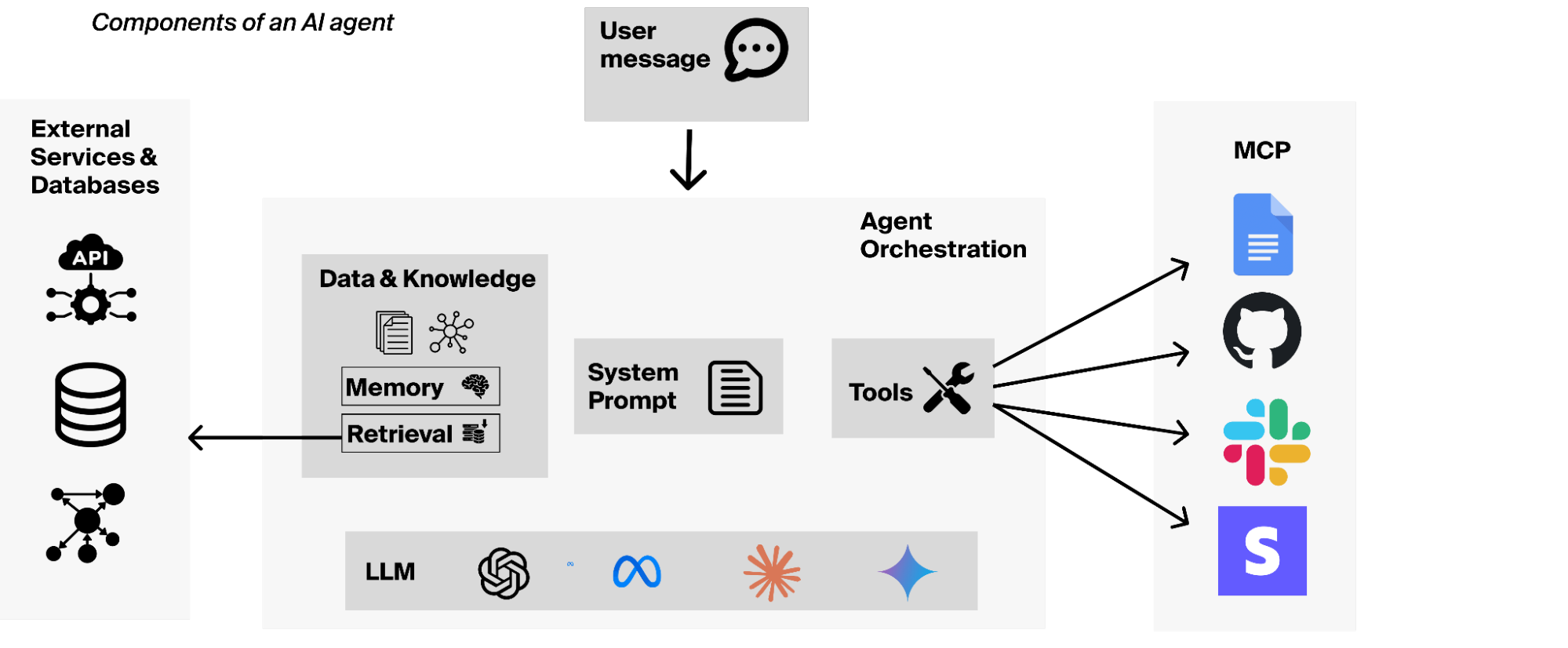
When creating agents that are empowered to take action on your behalf, Hypermode Agents has a unique approach by focusing on two key principles:
- Domain-specific design: Rather than building general-purpose AI assistants, Hypermode encourages creating specialized agents for specific roles, like financial operations, customer support, or marketing. This specialization leads to more reliable and effective execution.
- Natural language configuration: Instead of writing code, you describe your agent's role, background, and capabilities in plain English. Hypermode's Concierge agent guides you through an interview-style process to build comprehensive system prompts that power your specialized agents.
The power of MCP connections
What makes these agents truly powerful is their ability to connect to external services through MCP servers. These connections give your agents "tools" - specific functions they can call to interact with services like Stripe, Notion, Google Calendar, and over 2,000 other integrations.
Think of MCP connections as giving your agent superpowers. Instead of just generating text, your agent can:
- Process real payments through Stripe
- Fetch customer data and transaction history
- Apply complex business policies stored in knowledge bases
- Generate invoices and handle refunds
- Analyze financial trends and generate reports
Building your first financial operations agent
Let's walk through creating a financial operations agent that can handle real-world payment workflows.
Step 1: Agent creation with Concierge
After signing in and creating a free Hypermode account, start by describing your agent's purpose to Hypermode's Concierge:
Let's build a financial operations agent that can process payments, handle refunds,create invoices, and analyze financial data using Stripe. It should be able to work with our internal policies from Notion to make decisions about refunds.
The Concierge will ask clarifying questions about your business, brand guidelines, and specific operational needs. It then generates a comprehensive system prompt that defines your agent's identity, capabilities, and workflows.
Step 2: Configure the Stripe connection
Once your agent is created, add the Stripe connection:
- Click "Add connection" in your agent's settings
- Search for and select Stripe
- Authorize with your Stripe API key (use test keys for development)
It’s recommended that you create a restricted API key in Stripe that only has the permissions your agent needs. This follows the principle of least privilege for better security. Better yet, start with a Stripe sandbox to ensure you’re only operating on test data. You can even use your new agent to populate a Stripe sandbox environment.
Step 3: Add supporting connections
For complex workflows, add additional connections such as:
- Notion for internal policies and procedures
- Google Calendar for scheduling and planning
- Slack for notifications and approvals
Real-world workflow examples
Let's explore some practical scenarios that demonstrate the power of combining Hypermode Agents with Stripe.
Intelligent refund processing
One of the most compelling use cases is automated refund processing that considers complex business policies:
A customer is requesting a refund for transaction pi_3Rq5PfGb0nZyxz610ZOBBXqt.
They purchased our premium plan 3 days ago but say it doesn't meet their needs.
Here's what happens behind the scenes:
- Policy retrieval: The agent fetches your refund policy from Notion
- Customer analysis: It looks up the customer's payment history and subscription details
- Policy application: The agent applies your business rules (e.g., "Full refunds within 7 days for premium customers, but reduce by 30% if customer has had 2+ previous refunds")
- Decision and execution: Based on the analysis, it either processes the refund or explains why it's denied
The agent might respond:
🔄 Refund Analysis Complete 🔄

Customer: John Smith (Premium subscriber)
Transaction: $29.99 (3 days ago)
Previous refunds: 2 in last 12 months

Decision: Partial refund approved (70% = $20.99)
Reason: Policy allows full refunds within 7 days, but customer has exceeded the 2-refund threshold, triggering 30% reduction per company policy.

Refund processed: $20.99
Revenue analysis and campaign generation
Ask your agent to analyze your current financial position:
What is our current MRR and what marketing campaigns could we create to increase revenue based on our customer data?
The agent will:
- Query all active subscriptions from Stripe
- Calculate monthly recurring revenue (MRR)
- Analyze customer purchase patterns
- Suggest targeted campaigns with specific Stripe payment links
Customer onboarding automation
For sales and customer success teams:
Create a subscription for Bob Fubar for the premium plan and generate an invoice for the setup fee.
The agent handles the complete workflow:
- Creates the customer in Stripe
- Sets up the subscription with proper pricing
- Generates and sends the invoice
- Provides confirmation with transaction details
Sandbox environment setup
For testing and development, you can even ask your agent to populate sample data:
Set up a realistic test environment with 10 customers, various subscription types, and some sample transactions for testing.
This is particularly useful for onboarding new team members or testing agent workflows.
Advanced features and capabilities
Hypermode Agents supports various AI models (GPT-4, Claude, Gemini), allowing you to choose the best model for specific tasks:
- GPT-4: Great for general financial operations
- Claude: Excellent for code generation and complex reasoning
- Gemini: Strong for document generation and content creation
Beyond simple prompting, Hypermode enables sophisticated context management to ensure your agent always has access:
- Knowledge retrieval: Automatically fetch relevant policies and procedures
- Transaction history: Maintain context across long conversations
Getting started
Ready to build your own financial operations agent? Here's how to get started:
- Sign up for Hypermode Agents at https://hypermode.com/login
- Follow the tutorial at docs.hypermode.com/first-operations-agent
- Connect your Stripe test account using the connection guide
As you start building, it’s a good idea to keep in mind some best practices:
- Start with test data: Always use Stripe's sandbox environment for initial development
- Iterate on prompts: Your agent's instructions can be refined based on real-world usage
- Add human oversight: For high-value transactions, build in approval workflows
- Monitor and log: Keep track of your agent's decisions for compliance and improvement
Conclusion
The combination of natural language agent creation and powerful service integrations represents a significant shift in how you can think about business automation. Instead of building rigid systems with predetermined workflows, you can create intelligent agents that understand context, apply complex policies, and adapt to changing business needs.
With Hypermode Agents and Stripe, financial operations teams can focus on strategic decisions while routine tasks are handled automatically. Customer support can provide faster, more accurate refund decisions. Sales teams can quickly generate custom pricing and payment links. Finance teams can get real-time insights without waiting for reports.
This is about democratizing the power to create sophisticated business automation. If you can describe what you want your agent to do, you can build it.
Ready to transform your financial operations? Start building your first agent today and experience the power of natural language automation with Stripe and Hypermode.
Additional resources:
- Watch the Stripe Office Hours livestream, Building domain specific agents with natural language using Hypermode.
- Read the Hypermode Agents Stripe connection guide, or follow the Hypermode Agents financial operations agent tutorial.
- Try Hypermode's 30-day Agent Bootcamp.
- Join the community on Discord to share your agent creations and get support.