At Stripe, we obsess over streamlining developer experiences. Take Stripe sandboxes, our isolated test environments that allow developers to get started testing. The first thing you get when you register for a Stripe account is a set of sandbox keys for testing.
When it takes 40 minutes to build a payments integration, spending a minute signing up isn’t that big of a deal. But when an agent only takes a few minutes to build an integration, suddenly the signup friction becomes more apparent.


We heard from our partners at companies like Vercel, Replit, and Lovable that they wanted a way to provision Stripe sandboxes for their users without requiring a sign-up flow. This would allow users on their AI app platforms to create test payment integrations with zero friction. Together we designed the claimable sandbox primitive. A claimable sandbox is a fully functioning Stripe sandbox with working API test keys, but it does not require any registration to acquire. They help users test integrations without having to register for an account. After the payment integration is complete, you can “claim” the sandbox. Delaying registration avoids context switching, letting you (and your agent) stay in flow state.

We believe this primitive of letting an agent easily explore your product offerings and defer signing up will become a common practice, but it requires careful consideration of security and cost implications.
This post will detail how we built these claimable, anonymous, ephemeral sandboxes, which we now use in the docs, offer via API, and expose as a CLI command.
Docs: Logged-out users that visit docs.stripe.com get a unique sandbox that allows them to interact with personalized features, like interactive code snippets, a shell within Workbench, and customized integration guides.
API: The Claimable Sandboxes API is designed for users to provision Stripe sandboxes on platforms like Vercel, Replit, Lovable, etc.
CLI: The stripe sandbox create CLI command does not require a signup and allows an AI agent to get working keys with no browser registration required. We designed this specifically for agents.
Here is an example of this working in the CLI. An agent calls the CLI to get sandbox keys:
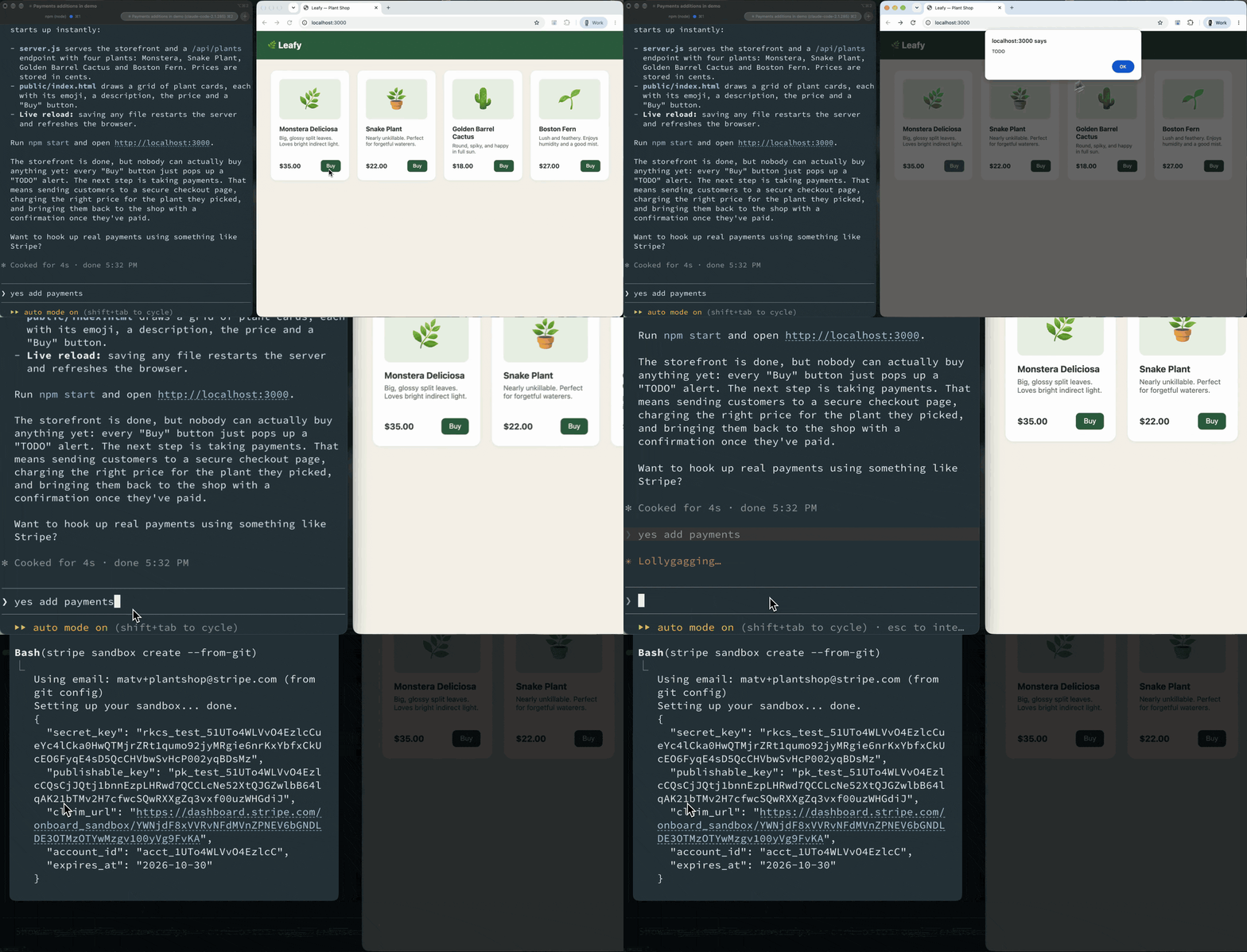
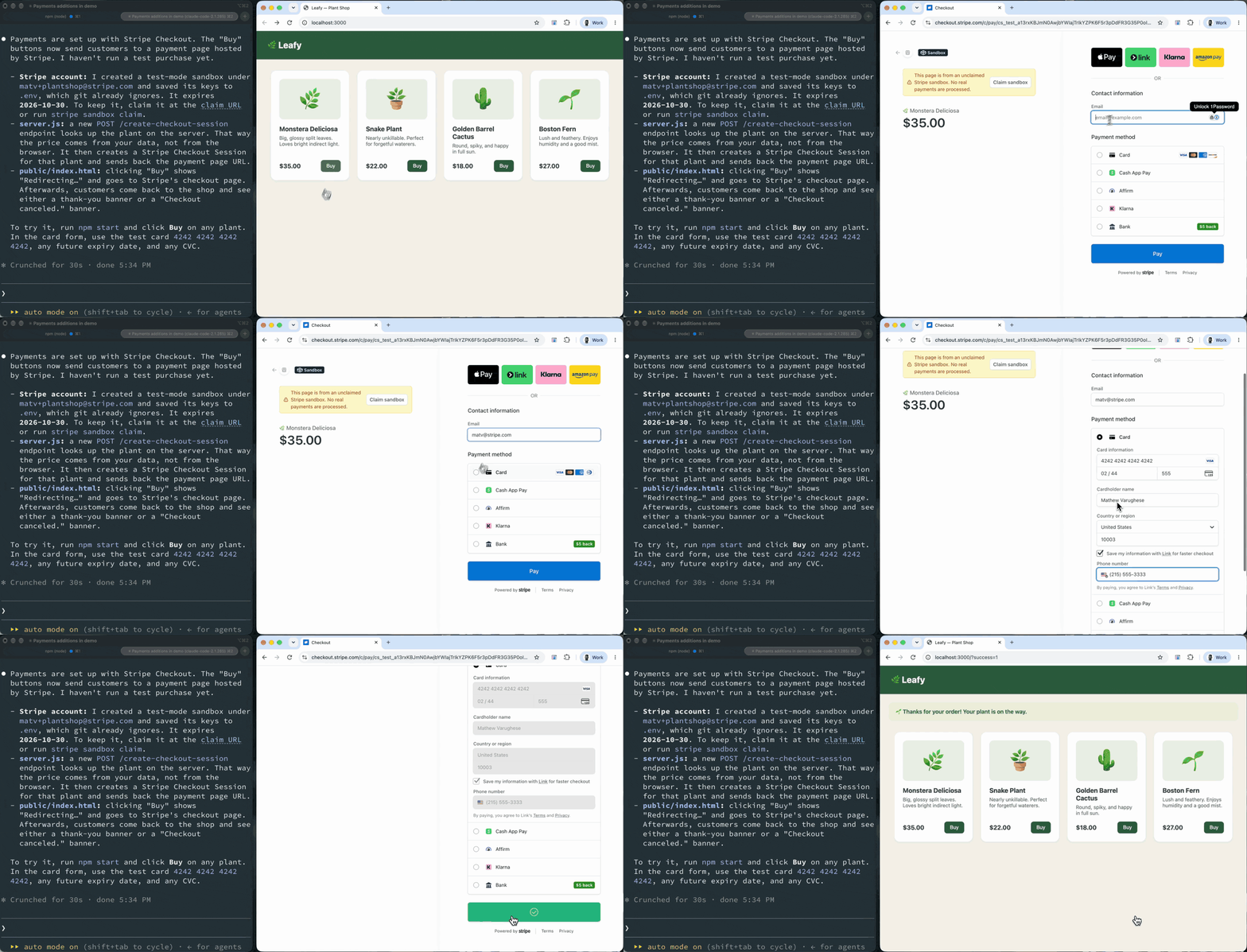
After a few minutes, I have a working payment flow I can test:
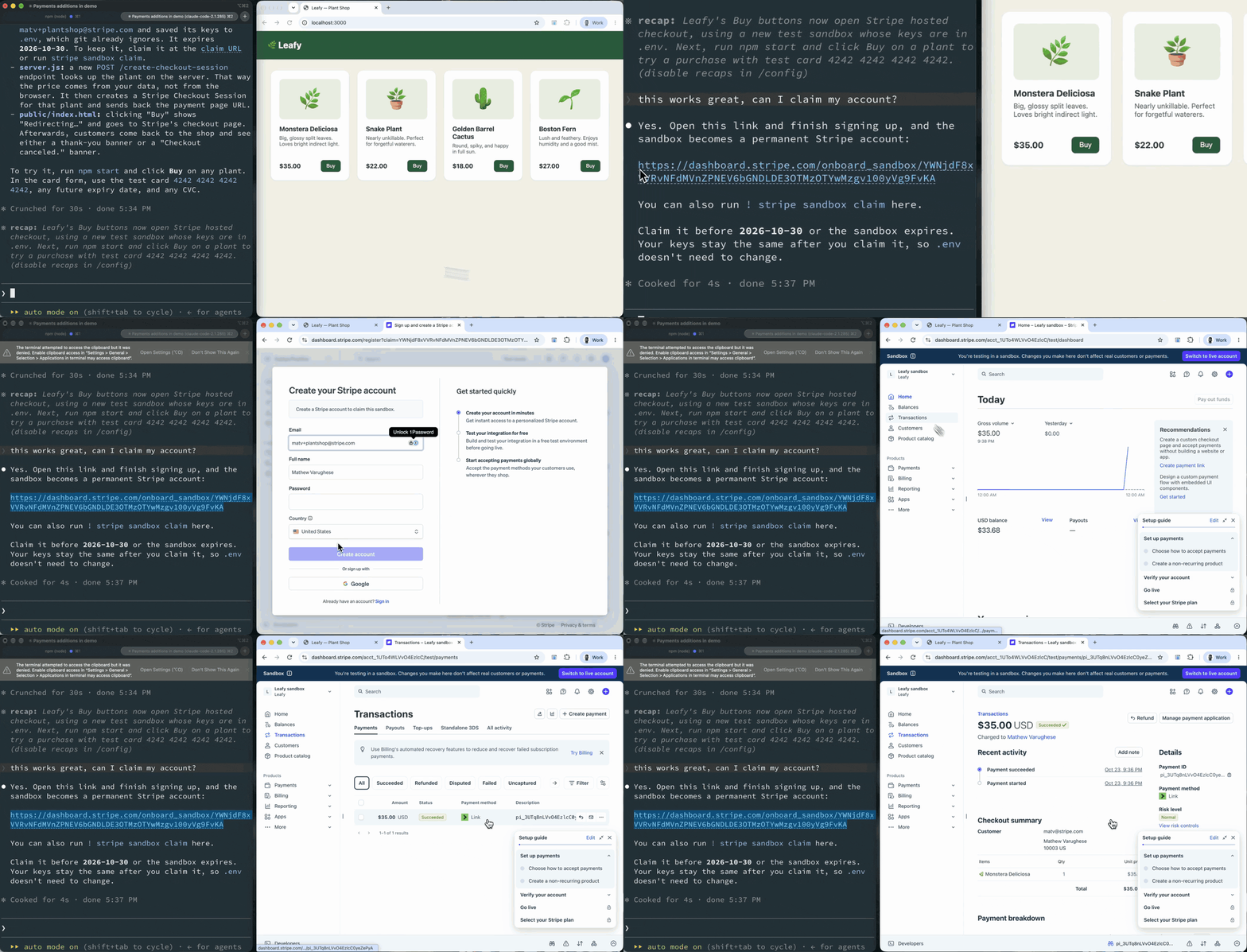
When I am ready, I can claim the sandbox by registering for a Stripe account (notice it prefills my email using my git config!). I can navigate to my transactions and see the test payment and objects created before I claimed:
Every day, thousands of new users create real Stripe accounts through a claimable sandbox after successfully integrating a payment flow. From Christmas lights installers to mobile phone repair shops, these businesses combined collectively process more than $3M/week.
Under the hood
Provisioning over 50,000 Stripe sandboxes a day with fully functioning API keys has latency, security, and cost implications. Although these keys can only interact with test-mode objects, their requests are still served by Stripe’s production infrastructure. We want to ensure that bad actors (or agents) can’t abuse this to take down traffic for legitimate users.
First, we tackled latency. Provisioning a sandbox takes a few seconds. We did not want to introduce latency to every docs request or every time a user of Replit or v0 builds a new Stripe integration. We solved this with a pool of “hot-and-ready sandboxes.” We use Temporal to run a provisioning workflow on a cron schedule that populates the pool with references to Stripe sandbox accounts. This is partitioned by country, use case, and developer platform. When a sandbox is requested via these different use cases, for example, if Claude Code runs stripe sandbox create, it pulls from this pre-populated pool and the particular use case. Each partition has different rate limits.
To tackle cost, we set specific TTLs for these sandboxes. The sandbox creation itself is not the expensive piece–it is indefinitely storing an unbounded set of data in that sandbox. We don’t want to keep around dummy test data that is not connected to a real user account indefinitely, so we set expiry dates on the sandboxes. We built a deletion pipeline to delete sandboxes that are not claimed by a user after this specified time. It involves a sweeper job (also running on Temporal) that kicks off deletion pipelines of the sandboxes and associated data once they are past their TTL.
Security and keeping the rest of Stripe safe is a huge concern. For the CLI and API use cases we require an email address. This is to prevent phishing attacks, where a phisher could collect sandboxes and trick users into claiming. This allows us to present this email during the claim so that it’s clear how the sandbox link is created and also has a UX benefit of streamlining account registration. For the Docs case, the claim process occurs through browser cookies. We also created a new Stripe API key type specifically for claimable sandboxes, with its own rate-limiting tier. This prevents claimable-sandbox traffic from negatively affecting the rest of Stripe’s systems.
For the API, we have partitions in the pool and per-provider rate limiting to ensure that one partner cannot drain the pool for the others. For the Docs case, we rely on hCaptcha, which uses browser signals to ensure that bad actors cannot make requests and drain the pool. But, the CLI is not straightforward. We wanted to make the CLI flow as frictionless as possible, which meant any browser pop-ups were a non-starter. How can we balance security of Stripe systems with a friction-free, unauthenticated endpoint that shares working API keys? We could not rely on typical browser captcha mechanisms so we created a system very similar to mCaptcha.
When the Stripe CLI requests a new sandbox, our servers return a proof-of-work puzzle for the CLI to solve. To simplify slightly, the server generates 3 key variables:
- A random salt
- A secret number. The larger this number, the more difficult it will be for the client to solve the puzzle. Higher difficulties take clients longer to solve, which in turn decreases the request load on our servers.
- A challenge, which is the hash of the salt and the secret number.
The Stripe CLI gets back the salt and the challenge, and needs to brute-force iterate to find the secret number, by hashing the guess and the salt until it equals the challenge. Then, it sends this back to Stripe servers, where we can verify the submitted solution against the challenge by hashing it.
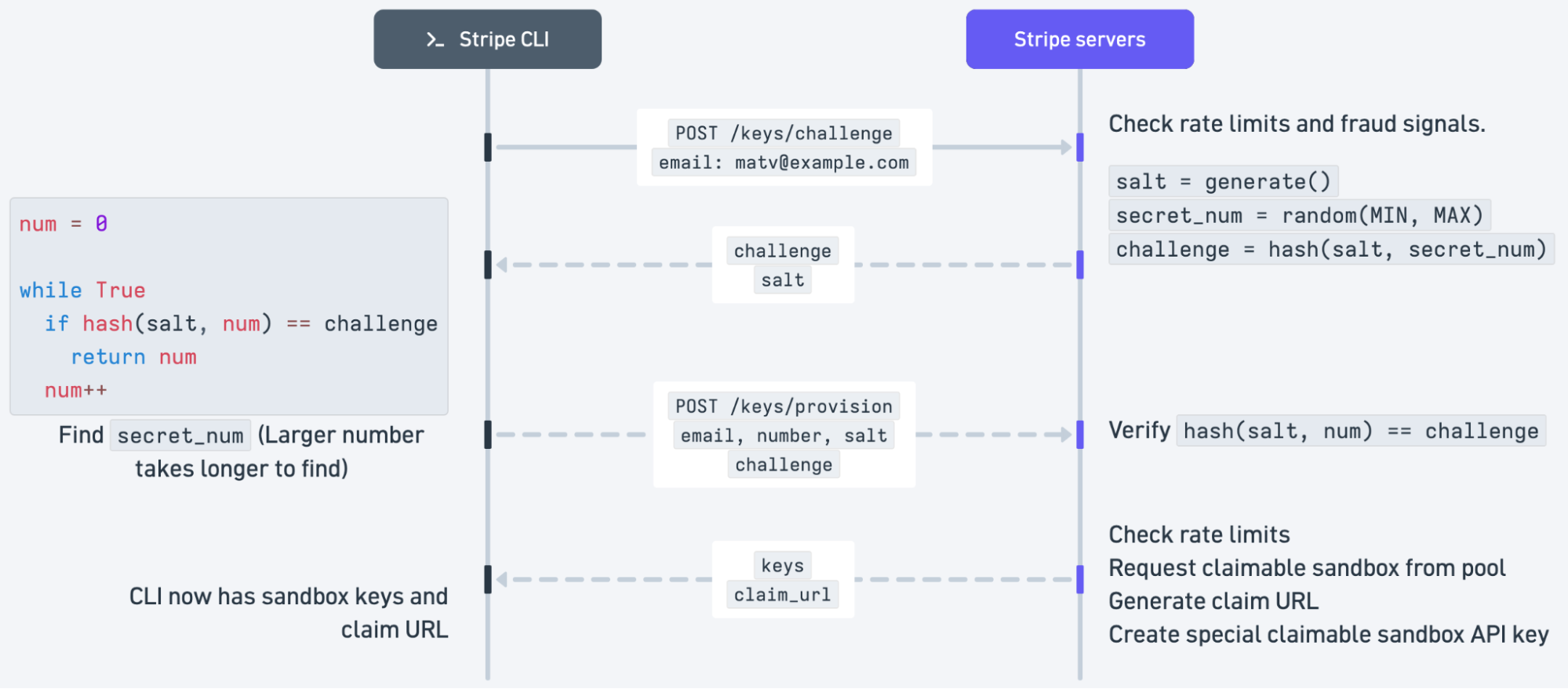
The appeal of this approach is it can be entirely in the terminal. On Stripe’s servers, we are able to dynamically increase the time (aka the ‘difficulty’) it takes the user’s machine to solve the challenge by increasing the size of the secret number. This difficulty is determined based on numerous signals, including current server load, and fraud signaling based on the supplied email. There are also different layers of rate limits, and other typical security safeguards at play, such as HMAC signing of the challenge string and expiry time built into the salt.
Claiming a sandbox and onboarding
When we provision a claimable sandbox we also generate a unique link that lets a user claim it. The user can either create a new Stripe account or attach the sandbox to an existing account. In either case, the sandbox retains all API activity and objects created in it before the claim.
After claiming, the user enters a tailored onboarding flow in the Stripe dashboard. For example, if sandbox activity indicates a subscription-based pricing model, we present a subscription-business onboarding flow.
We finalize a claim through an operation called reparenting. Stripe accounts are modeled as a graph in which sandboxes are children of live mode accounts. Because a Stripe user might have access to multiple accounts (many of our users operate multiple businesses), the Stripe “user” object lives separately from the account graph, because one user may operate multiple businesses and therefore have access to multiple accounts. Access must be granted to each account individually.
During the reparenting operation we select the live-mode account, make it the sandbox’s parent, mark the sandbox as claimed, and grant the Stripe user access to both accounts. If the user creates a new live-mode account, we also copy relevant settings and data—such as the business name, time zone, and country—from the sandbox. Some data is copied synchronously, while the rest is copied asynchronously to reduce latency.
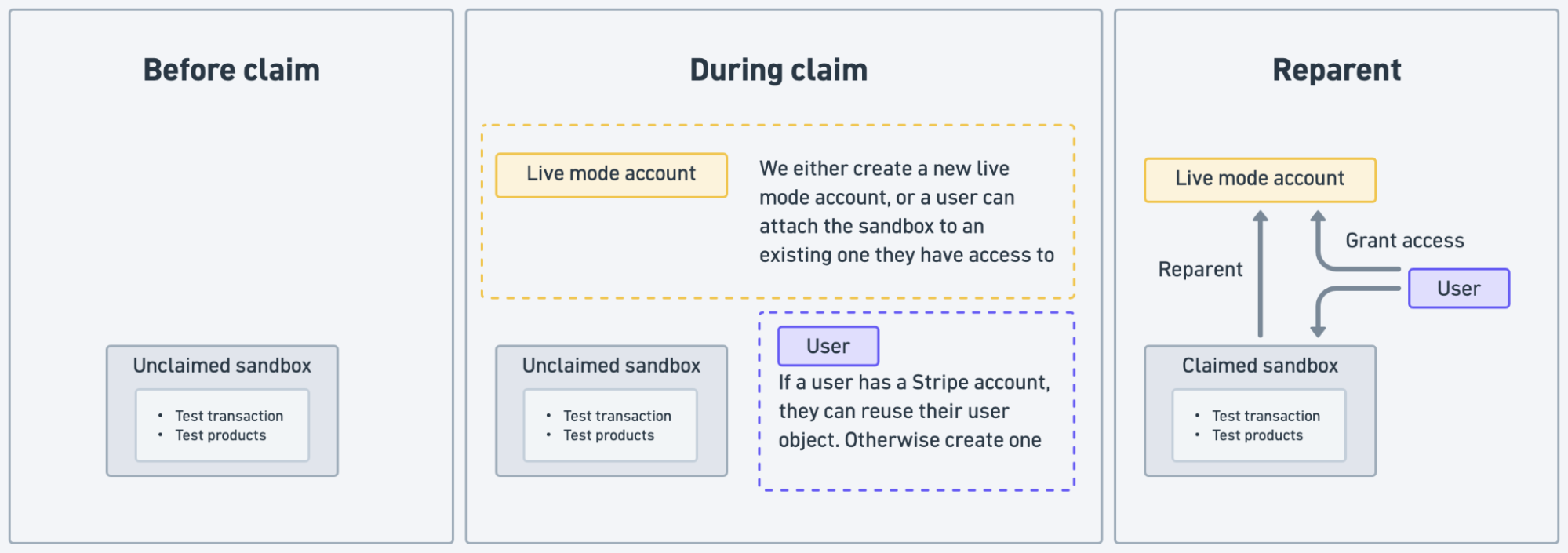
For platforms that use the Claimable Sandboxes API, we emit webhooks at each stage of the claimable sandbox lifecycle, including creation, upcoming expiration, expiration, and claim. We also email the platform’s user a link to claim the sandbox. To reduce security risks, claim links expire after seven days and platforms can refresh an expired link by generating a new one. The claim flow must balance numerous edge cases across the reparenting operation, considerations for new and existing accounts, email delivery, link expiration, and platform-driven link refreshes without compromising security, latency, or UX.
Conclusion
Coding agents are like faster bikes: they let you explore faster. But, smooth riding is not just about your bike, it’s about the infrastructure around you. Biking down a paved path is a much better experience than riding down a busy city street with no bike lane and red lights every 20 feet. In other words, fast bikes won’t save you from bad infrastructure. Coding agents still need great developer experience to succeed. Even though they compress hours of integration work into minutes, they make every interruption even more visible.
Claimable sandboxes remove one of those interruptions: an agent can provision working test keys, build and verify an integration, and let the user register only when they are ready. More than 100,000 businesses have now been started with a claimable sandbox. Stripe is evolving our agent experience and looking at how to make it easier to build integrations and operate businesses. If you are building an integration with an agent, point it to docs.stripe.com/agents.md to get started.
And, if you’re interested in building cool stuff for agents and developers at Stripe, we’re hiring. Check out our engineering jobs.