You’re a developer at a growing online bookshop where customers are browsing shelves of bestsellers, filling their carts with everything from sci-fi novels to cookbooks, but there’s one critical piece missing before you can launch: a smooth, reliable checkout page.
It sounds straightforward until you realize how much has to happen behind a single Pay button in just a few seconds. Your system must:
- Communicate with card networks like Visa and Mastercard through multiple intermediaries
- Coordinate with the customer's bank for real-time fund verification and authorization
- Run fraud detection checks and risk assessment
- Comply with regulations like PCI-DSS, Strong Customer Authentication (SCA) in Europe, and data privacy laws like GDPR
- Handle currency conversion with varying decimal precision across 135+ currencies
- Support diverse payment methods from cards to Apple Pay to buy-now-pay-later, each with unique integration requirements
- Manage payment states that go far beyond simple success or failure
All of this needs to happen in 2-3 seconds or customers abandon their carts.
Stripe abstracts payment networks, banking relationships, compliance requirements, and fraud detection, into a unified API so you don’t have to build direct integrations or manage PCI-compliant infrastructure.
This blog walks you through the PaymentIntent lifecycle as a state machine, and shows how webhooks keep your systems in sync when payment states change.
Understanding the state machine of a Stripe payment journey
Let's look at what happens during a card transaction using Stripe's core payment primitive, the PaymentIntent object. A PaymentIntent represents your intent to collect payment from a customer and tracks the payment lifecycle end to end. Think of a payment as a state machine that moves through multiple stages:
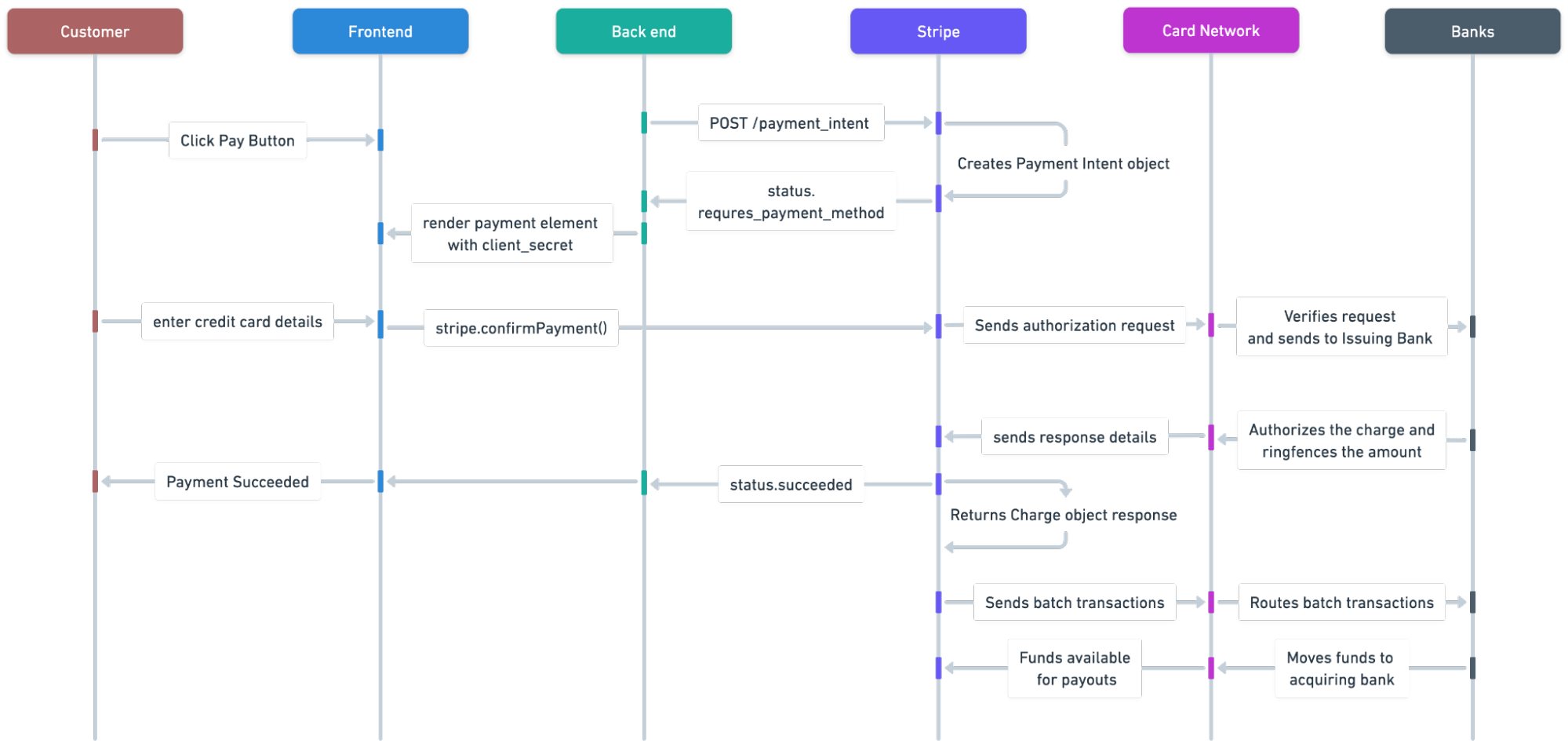
- Customer checkout: Your customer is ready to checkout. Your application creates a shopping experience, captures cart details (items, total amount, currency) and collects payment method details.
You create the PaymentIntent as soon as you know the amount and currency. This records the intent to charge even if the payment ultimately fails.
// Server-side: Create PaymentIntent setting the amount and currency
const paymentIntent = await stripe.paymentIntents.create({
amount: 4999, // Amount in cents ($49.99)
currency: 'usd',
});
//Returns PaymentIntent object with a client_secret and status: 'requires_payment_method'
Then you render the Payment Element, an embeddable Stripe-hosted UI component that prevents sensitive card details from touching your servers, on the frontend using the client_secret. The client_secret is a unique key returned on a PaymentIntent object that enables client-side retrieval and is used by Stripe’s client SDKs to confirm the PaymentIntent and complete the payment:
//Render the Payment Element passing in the PaymentIntent's client_secret
const elements = stripe.elements({ clientSecret: 'CLIENT_SECRET'});

const paymentElement = elements.create('payment');
paymentElement.mount('#payment-element');
- Tokenization: Once the customer enters card details, you need to collect and send them securely. Stripe provides PCI-compliant interfaces (hosted pages or embeddable components) so you never need to handle sensitive PCI data. Stripe converts sensitive payment details into a single-use token. This is a safe reference to the card that you can send to your server. The actual card numbers are encrypted and stored in Stripe's vault, allowing you to only handle non-sensitive tokens.
Stripe’s hosted surfaces leverage client-side tokenization, the process of converting sensitive card data into a non-sensitive unique identifier referred to as a token, allowing you to confirm the PaymentIntent, attach the payment method details and instruct Stripe to begin authorization in a single call:
//Client-side: Confirm payment (tokenizes and authorizes in one call)
stripe.confirmPayment({
 elements,
 confirmParams: {
  // Return URL where the customer should be redirected after the PaymentIntent is confirmed.
  return_url: 'https://example.com',
 },
})
.then(function(result) {
 if (result.error) {
  // Inform the customer that there was an error.
 }});
-
Authentication and authorization: Stripe routes the request to the card network and issuing banks to verify the cardholder and available funds. In the background, Stripe performs fraud checks and risk evaluation, and may retry intelligently to improve authorization rates. Once verified, the bank places a hold on the funds. If required (commonly for SCA in Europe) Stripe also guides the customer through 3D Secure (3DS) or redirects them to a bank authorization page when calling
stripe.confirmPayment(). -
Capture: After authorization succeeds, Stripe captures the payment. A capture indicates to Stripe that the funds are ready to be acquired and triggers the movement of funds. You can capture immediately or later (for example, when you ship the product).
The PaymentIntent creates a Charge object that represents a single attempt to charge the card. Stripe translates the raw response codes from the bank and card network into readable messages and surfaces them in the Charge object. You can observe the downstream actions and results that Stripe performs on your behalf. For example, in the webhook event response for payment_intent.succeeded below we see that the charge was approved by the card network and authorized by the bank.
//Webhook event: payment_intent.succeeded
{
  "data": {
    "object": {
      "id": "pi_xxx",
      "object": "payment_intent",
      "charges": {
        "object": "list",
        "data": [
          {
            "id": "ch_xxx",
            "object": "charge",
            "amount": 4999,
            "amount_captured": 4999,
            "outcome": {
              "network_status": "approved_by_network",
              "risk_level": "normal",
              "risk_score": 48,
              "seller_message": "Payment complete.",
              "type": "authorized"
            }
          }
        ]
      }
    }
  }
}
- Settlement and Reconciliation: After capture, Stripe coordinates the clearing and settlement process with card networks and banks, batches transactions, and sends funds to your business bank account. This happens typically 2-3 days after the initial transaction.
Even after the on-page checkout flow ends, the payment can still change state. This is why webhooks are essential for keeping your system in sync. A webhook is a way for one system to automatically notify another system when something happens. Instead of your app repeatedly checking (or polling) to see if a payment succeeded or failed, Stripe sends your app a message as soon as that event occurs. It’s like subscribing to real-time delivery updates. You get the status change when it happens.
Listen to webhooks for managing asynchronous processes
Your application needs to react to payment state changes that might happen minutes, hours, or days after the initial charge. Customers can request refunds or raise a dispute with their bank days after the charge has been processed. To manage these asynchronous events reliably, set up webhook listeners so your app can respond the moment Stripe posts a status update. Common event types your application (or downstream systems) may need to handle include:
payment_intent.succeeded- confirms the payment completed successfullypayment_intent.requires_action- indicates additional customer authentication or action is requiredcharge.failed- occurs when a charge attempt failscharge.dispute.created- occurs when a customer disputes a charge with their bank
For example, by listening to the payment_intent.succeeded webhook event, you can trigger your order management system to ship the books to the customer once payment is confirmed. Additionally, by listening to the charge.dispute.created webhook event, you can be notified when a customer disputes a charge and take appropriate action, such as providing evidence of the books being delivered or issuing a refund.
Treat these webhook events as the source of truth for payment state, so your app and downstream systems stay accurate and resilient without polling or guessing about when changes will occur.
Conclusion
Payments are inherently complex and behave like state machines. Every transaction moves through checkout, tokenization, authorization, capture, and settlement, and state changes can occur asynchronously at any point in that lifecycle.
Think of payments as event-driven, not request-response, like ordering a book for your shop. You don’t wait by the door for the delivery, but instead you get notified when it arrives and then shelve the book. To keep your system accurate after the initial charge, use Stripe webhooks as the source of truth for payment state changes.
If you’re ready to make your integration resilient, start by implementing and testing your webhook endpoint using Stripe’s Webhooks Quickstart, then use the event type reference to choose the events that your applications need to handle.